
FREE PUBLIC PRACTICE · NO SIGN-IN REQUIRED
Scope change communication: turn a decision into clear next steps
Practice communicating an approved scope change to delivery teams and sponsors without inventing approval, hiding uncertainty, or promising an unsupported date.
Original READY self-study material. Your work stays in your own document; this page does not save, grade, award credit or change READYScore.
What you will practise
- Distinguish a requested change from an approved decision.
- Tailor one factual decision record to two audiences.
- State accountable actions and unresolved dependencies.
Communicate the decision people need to act on
An impact analysis helps someone decide whether a change is worthwhile. After that decision, the team needs to know what to do differently. This original exercise focuses on the communication that follows an approved scope change: the decision, its limits, the affected work, and the next checkpoint. It builds a different skill from calculating the change impact itself.
PMI’s scope-change control discussion connects requests, evaluation, approval, and communication. Use that principle as background, then follow the authority and facts supplied in this fictional case. A friendly acknowledgment is not approval, and a copied stakeholder is not automatically an accountable owner.
The decision record
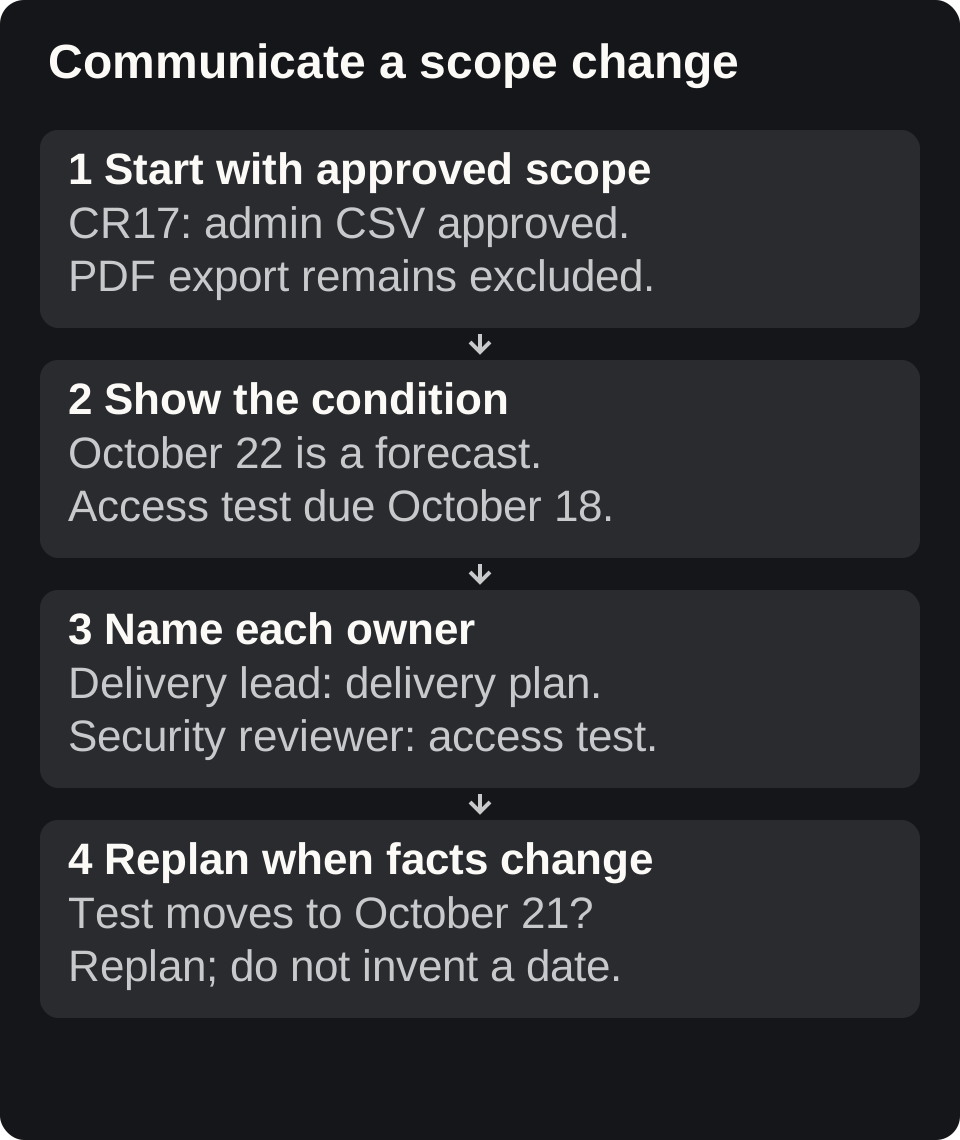
A team is building a customer onboarding dashboard. The original release includes account setup and a progress view. Change CR-17 adds a CSV export for administrators. The sponsor approved the CSV export on October 6 in the exercise record, with an additional two days of delivery work and no change to the agreed access restrictions. A PDF export was explicitly excluded. The delivery lead owns the revised plan; the security reviewer must confirm the existing admin-only access test before release.
The original target was October 20. The team estimates October 22 if the access test finishes by October 18, but that dependency has not yet been confirmed. These dates are fictional learning inputs, not READY delivery commitments. Your message must preserve the conditional estimate instead of turning it into an unconditional promise.
Adapt the message for the sponsor
The sponsor needs the decision outcome and the remaining delivery risk, not the full task breakdown. A useful summary is: “The approved CSV export is included in the revised plan. The forecast is October 22, conditional on the access test completing by October 18. The delivery lead will report a revised forecast if that dependency changes. PDF export remains outside CR-17.” Both audiences receive the same facts, with different detail.
Avoid claims such as “Everyone agreed,” “No risk remains,” or “The change is live” unless the decision record supports them. If a stakeholder replies asking for PDF export, record it as a separate request. Do not quietly extend CR-17 or reinterpret silence as acceptance.
Your exercise and self-review
Download the worksheet. Write a delivery update of 100–150 words and a sponsor update of no more than 75 words. Include the decision identifier, approved scope, excluded scope, action owners, conditional forecast, and the next evidence needed. Then revise both messages after learning that the access test will finish October 21. Do not invent a new release date without an updated plan.
A strong revision flags that the earlier forecast condition has failed, names who will replan, and sets a next update rather than promising an unsupported date. Check the two messages for factual consistency. This is a free training exercise; submitting or discussing a draft does not grant certification, course completion, or READYScore.
Worked delivery-team update
“CR-17 approved: add an administrator CSV export; PDF export is outside this change. The delivery lead will update the implementation plan to include two additional days of work. Preserve admin-only access and include its verification in release checks. October 22 is the current forecast if the access test completes by October 18. The security reviewer will confirm that dependency at the next checkpoint; raise a forecast risk if it slips.”
Notice the relationship between each action and an owner role. The message says what changed, what remains constrained, and what would invalidate the forecast. It does not ask every recipient to approve the same decision again. It also avoids treating the estimate as evidence that the work is implemented, tested, or released.
Put it into practice
Complete the exercise
- Download the worksheet. Write a delivery update of 100–150 words and a sponsor update of no more than 75 words. Include the decision identifier, approved scope, excluded scope, action owners, conditional forecast, and the next evidence needed. Then revise both messages after learning that the access test will finish October 21. Do not invent a new release date without an updated plan.
Decision ID:
Approved/excluded scope:
Owner/action:
Forecast and condition:
Next checkpoint:
Changed-evidence revision:
Download the practice files
Review your reasoning
Try the exercise first, then open these self-review hints. They are guidance, not an assessment result.
Do both audience messages preserve the same approved facts and conditional forecast?
A missed forecast condition requires replanning, not an invented new date.
Independent learning, clear boundaries
Original independent READY learning. Not official Google or Coursera training or endorsed by either provider. All scenario data are fictional. This resource does not award a Google Professional Certificate, READY certification, course credit or READYScore. Written practice is self-reviewed, not automatically graded; this public page has no account save, submission or reward function.
These exercises use fictional examples. They do not replace production authorization, provider credentials, professional advice or certification requirements.
Official references
- PMI: Scope change control
Request evaluation, approval and communication process and explicit change authority; fictional scenario and messages are original.